Before we get started on Azure Virtual WAN, I want to pause and thank a good friend and former Microsoft Cloud Solution Architect, Paul Paginton. Paul is not just one of the best networkers I’ve worked with, he’s one of the best full stop. The kind of engineer who doesn’t just understand routing, but genuinely feels it. I’ve always said he probably sees the world in binary or some kind of Matrix-style digital rain. His ability to break down complex architectures and get straight to the heart of a problem is second to none.
Once I began writing this vWAN series, I knew I needed someone who could challenge the thinking and pressure-test the depth. Paul was the first name that came to mind. Whether it’s BGP behaviour, VPN design, or just helping cut through the noise around Azure networking, he has always been a go-to for me. This series is stronger because of his input, and I’m grateful for the time and thought he gave to helping refine it.
It was actually Paul who suggested splitting this blog into two parts. At first, I thought it could hold together as one piece. But once we stepped back and looked at how deep it went, it became clear that it would serve readers better as a two-part series. The first half focuses on the core architecture and routing fundamentals. The second half dives into the edge cases, integration patterns, and the field lessons that define real-world success.
Thanks, Paul. You’re a class act, and the kind of voice more people need to hear in this space.
Part One: Architecture, Routing, and the Shape of the Modern Network
1. From Route Server to vWAN: Natural Progression or Full Reset?
We left off with Azure Route Server, the quiet hero of dynamic routing in a world of static chaos. It gave us a lifeline in traditional hub-and-spoke networks, finally letting our NVAs and VPNs talk BGP without needing every route manually carved into stone. Route Server took over the manual grind of User Defined Routes (UDRs) and brought some much-needed elasticity to otherwise brittle designs.
But for all its cleverness, Route Server doesn’t change the underlying shape of the network. You’re still the caretaker of peering relationships, still the one building and updating your own hubs, still knee-deep in route table logic when someone wants to plug in a new branch, region, or firewall. And if you want global scale or consistent security policies across 50+ locations? That’s where things start to creak.
At a certain point, your design stops being “clever” and starts becoming “fragile.”
Enter Azure Virtual WAN.
Where Route Server improves how traffic flows, vWAN reimagines the roads entirely. It’s not just another feature bolted on, it’s Microsoft offering you a whole new transport layer. One that’s already wired up with global reach, any-to-any routing, and service insertions baked in. You bring your connections, your policies, your intent and vWAN takes over the heavy lifting.
But before we get too comfortable, there’s a question that still haunts every network architect making this leap:
“If I’m using vWAN, do I still need a hub-and-spoke topology?”
2. To Hub and Spoke or Not to Hub and Spoke… That Is the Question
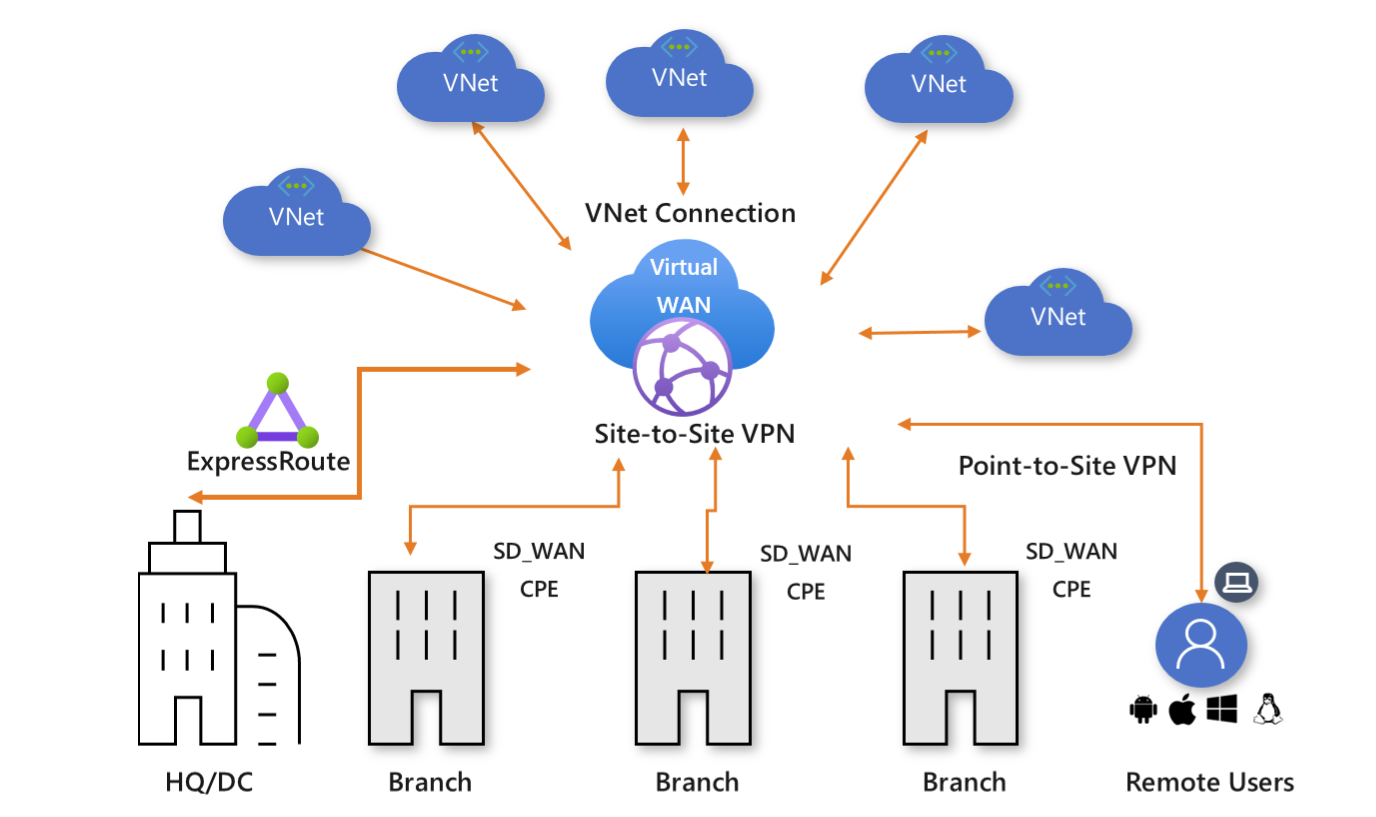
Let’s address it early, some engineers look at Azure Virtual WAN and think it’s cloud voodoo. Too abstract. Too hidden. Too far from the comfort of copper and CLI. And it’s no wonder, really. I’ve seen this evolution first-hand.
In my data centre days, we built security zones with tagged VLANs, trunk ports, and physical firewalls. Routing decisions lived in OSPF or BGP configs that we could see and trace. Everything had a console cable and a status light. Control was physical, and every design decision had a cable tie to go with it.
I used to enjoy going up and down the cabinets with my terminal on its trolley, console cabling into the switches, routers, even those old Cisco PIXs and Broadcom fibre switches. You knew where the packets were going because you plugged the thing in yourself. If it didn’t work, you knew exactly which cable to start tugging.
Then came the shift to cloud. We recreated what we knew using Azure’s hub-and-spoke VNet model. We peered networks, routed through central NVAs, and layered in user-defined routes to shape flows. It felt like home, just with a different set of tools. But we were still building it all by hand, with templates and scripts instead of rack screws and serial cables.
Now we’ve moved again into Virtual WAN.
This is not just another hub. This is Microsoft giving you a ready-made backbone, global-scale routing, integrated security services, and dynamic policy-based design. You don’t build the transit core anymore. You consume it.
And that’s where the pushback starts for some teams. You can’t physically see the hops. You can’t trace a packet through every VNet. You trust the platform to handle the pathing. It feels unfamiliar because it is. But it works, and it scales, and for the right use case, it simplifies everything.
So What Happens to Hub-and-Spoke?
It evolves. You still need segmentation. You still need control. You still need somewhere to anchor shared services and enforce inspection. But you don’t have to build that hub manually. You let Azure do it then define the policies and routes that shape how your workloads move.
Virtual WAN lets you connect spoke VNets, branch sites, ExpressRoute circuits, and even other vWAN hubs across the globe — all without needing to peer VNets or manage route propagation tables by hand. Instead, you assign connections to route tables, set up intent, and let the system handle the rest.
Real-World Use Cases
a) Migrating Legacy Hub-and-Spoke to vWAN
A customer with multiple regions already using traditional peering and NVAs can migrate gradually to Virtual WAN, keeping inspection in place while reducing manual routing overhead. They spin up a second hub, replicate policies, and slowly transition spokes.
b) Modernising Branch Connectivity
A global company with hundreds of branch offices connects via direct internet breakout, feeding into Virtual WAN VPN gateways. Inspection is handled centrally with Azure Firewall in the hub. No MPLS, no SD-WAN, just the Microsoft backbone and clear routing intent.
c) Preparing for Global Scale
A business expanding into Africa or the Middle East can deploy regional vWAN hubs close to new users. These hubs connect through the backbone to core services hosted elsewhere, giving performance without sacrificing control.
So no, hub-and-spoke is not dead. It’s just matured. You still need it, but you don’t have to build it the old way.
3. The Hub That Does Everything: Deep Dive into Virtual WAN Hub Services
By now, I’ve had to explain the vWAN Hub to a few customers, and every time, the same thing happens. They look at the Azure portal and say, “So this is just another VNet hub, right?” I don’t blame them. The word hub has baggage. In classic Azure designs, it meant a VNet you built yourself, packed with custom route tables, NVA pairs, and gateways stitched together by hand. That old hub needed constant care, regular patching, and a spreadsheet just to manage the routes.
This is not that.
The Virtual WAN Hub is something completely different. You do not deploy a VNet and bolt services onto it. The hub is a Microsoft-managed construct. You do not peer to it. You do not assign subnets. You do not see a VNet in the resource group. And yet, it becomes the single most important part of your network topology if you adopt vWAN.
So what is it, exactly?
Think of it as a regionally deployed edge of Microsoft’s global backbone. A programmable, scalable core that acts as your gateway, router, policy engine, firewall anchor, and connectivity hub. When you deploy a vWAN Hub, you are not provisioning infrastructure. You are provisioning a service fabric that lives at the edge of a massively scaled, software-defined backbone.
The Routing Fabric
At the centre of every vWAN Hub is a dynamic routing plane. You do not create it, and you cannot see it in the portal, but it is the brain that connects all your routes. When you link a VNet to the hub, or a site-to-site VPN, or an ExpressRoute circuit, that fabric handles route propagation automatically. There are no UDRs to manage here. You decide which connections send and receive routes using propagate and associate controls on route tables.
You can create multiple route tables within the hub, each with its own logic. This is where you control segmentation. For example, you may have a route table for spoke VNets, another for shared services, and a third for secured internet paths. These route tables are not like the ones in a subnet. They live inside the hub, and they affect how traffic flows between the connections, not within a VNet.
The routing fabric supports BGP. When a branch device connects via IPsec VPN and advertises prefixes, the hub will learn those routes dynamically. If you connect an ExpressRoute circuit, it does the same. You can even create static routes for edge cases, but most of the heavy lifting is handled by Microsoft’s backbone.
The Gateways
Unlike a traditional design where you deploy VPN and ExpressRoute gateways into a specific subnet, vWAN treats gateways as modular service options within the hub. You do not choose SKUs or sizes. You enable the gateway, and Microsoft provides a managed, scalable version.
The VPN Gateway in vWAN supports thousands of tunnels, active-active HA, and both static and BGP-based connections. It is designed for aggregation at scale. This is not the same gateway you deploy in a normal VNet. It sits directly on the Microsoft backbone, close to the edge, and integrates with the routing fabric without needing manual configuration.
The ExpressRoute Gateway works in a similar way. You link your ER circuit to the hub, and the routes from your on-prem network are automatically propagated into the vWAN route tables. This makes transitive routing possible across ExpressRoute, VPN, and VNets without needing to bridge traffic manually through a virtual appliance.
The Firewall
You can optionally deploy Azure Firewall into the hub. This is where things start to feel different from legacy designs. In a traditional model, you had to chain traffic through a firewall VNet, configure UDRs to force the path, and hope that someone remembered to update the next-hop when topology changed.
With vWAN, the firewall is a service insertion. You place it in the hub, and then apply Routing Intent. This too takes far too long to implement in practice. It is a declarative policy that tells the hub to redirect specific traffic types through the firewall. You do not configure route tables. You set intent. The hub rewires the flow internally.
You get two main intents: internet and private traffic. The internet intent routes all internet-bound traffic from connected VNets and branches through the firewall. The private intent handles spoke-to-spoke or branch-to-branch inspection. These are not UDRs. You do not control next-hop IPs. You enable the intent, and the hub adjusts the routing logic behind the scenes.
If you need more granular control, you can skip Routing Intent and use custom route tables instead. In my personal design preferences, I choose not to do this unless absolutely necessary. I find that mixing custom routing with hub-managed propagation increases complexity and can easily create unintended paths. In some customer designs, it has introduced more troubleshooting overhead than value. I favour simplicity and predictability and Routing Intent, once implemented, delivers that.
What It Looks Like in Practice
Here’s what changes when you use a Virtual WAN Hub.
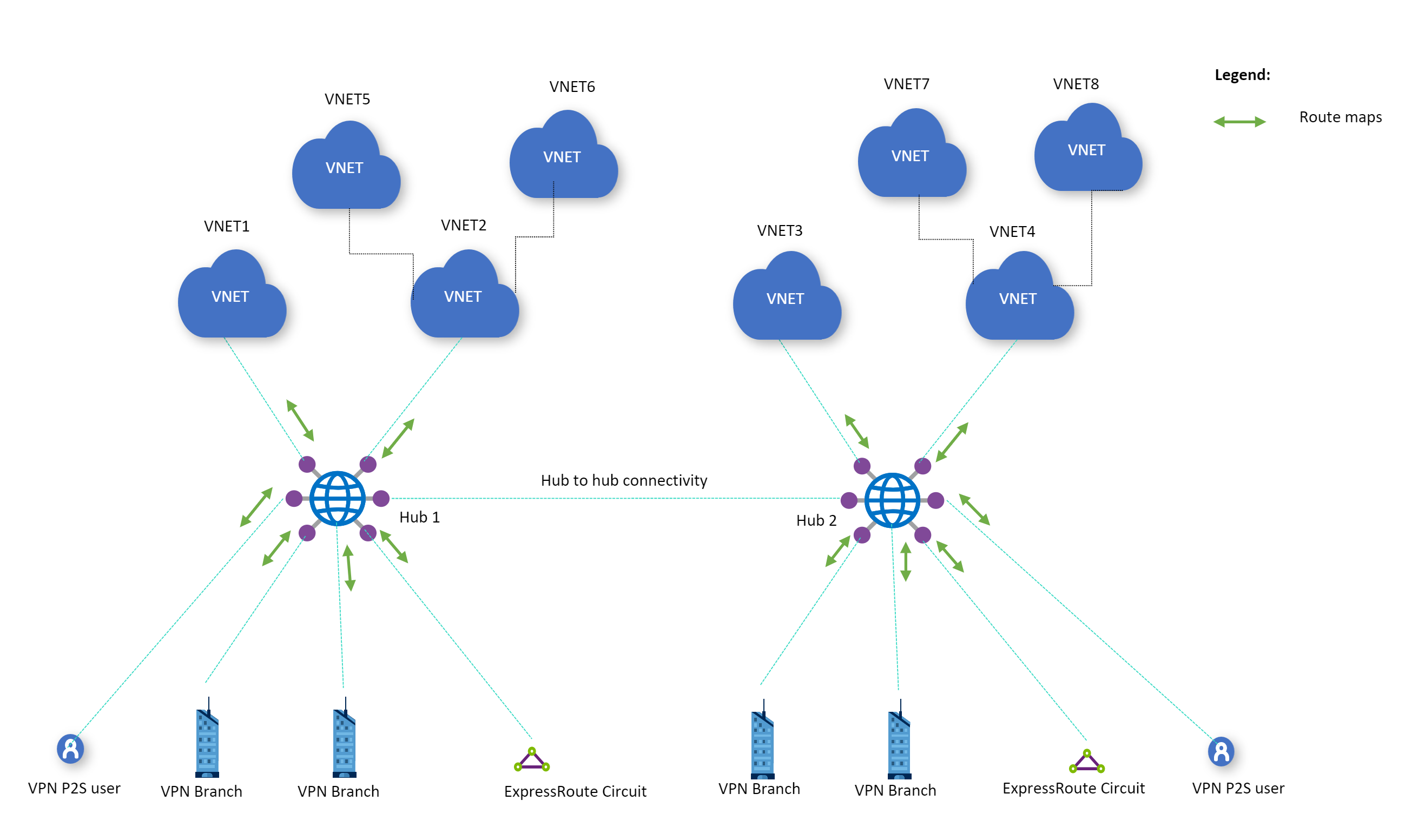
Instead of peering 20 spoke VNets to a hand-built hub, you connect them to a central managed fabric. Instead of placing NVAs in a shared subnet and writing UDRs for every scenario, you define routing logic once and apply it via the portal or API. Instead of maintaining route propagation rules across regions, you deploy multiple hubs and link them together using Microsoft’s backbone.
There is no express route circuit to the firewall, then from firewall to another subnet, then from that subnet to an internal load balancer. The hub sees everything, and if you configure it right, you only have to define your intent once.
This is not just easier. It is more stable. It is more scalable. And it removes most of the troubleshooting steps that come from asymmetric routes, missed next-hops, and broken peerings.
Where It Still Needs You
The vWAN Hub is powerful, but it is not magic. It does not solve poor IP planning. It does not fix overlapping address spaces. It does not understand your application tiers, your regulatory domains, or your performance SLAs. You still have to design your address space. You still have to model how route tables interact. And you still have to test every critical path.
But what it does give you is a foundation. A backbone-aware, cloud-native way to handle routing and security at scale, without needing to replicate your old data centre inside a subscription.
In the next chapter, we will dig into that routing model even further. What really happens to a route once it enters a hub? How do propagation and association interact? And how can you design around Routing Intent without falling into a black-box trap?
4. Routing in vWAN: Goodbye UDR Swamp, Hello Policy Control
One of the worst parts of classic Azure networking is the slow crawl through the UDR swamp. You start with a few route tables, manually assigning next-hops for internet traffic or firewall inspection. Then someone adds a third-party NVA. Then ExpressRoute. Then another region. Before long, you are balancing 15 route tables across five VNets, with each one needing its own logic, its own rules, and its own propagation behaviour.
Make one mistake, and traffic goes the wrong way. Make two, and it goes nowhere. Try to explain any of it in a Visio diagram and you end up building a legend just to describe the arrows. Virtual WAN is your exit from that swamp.
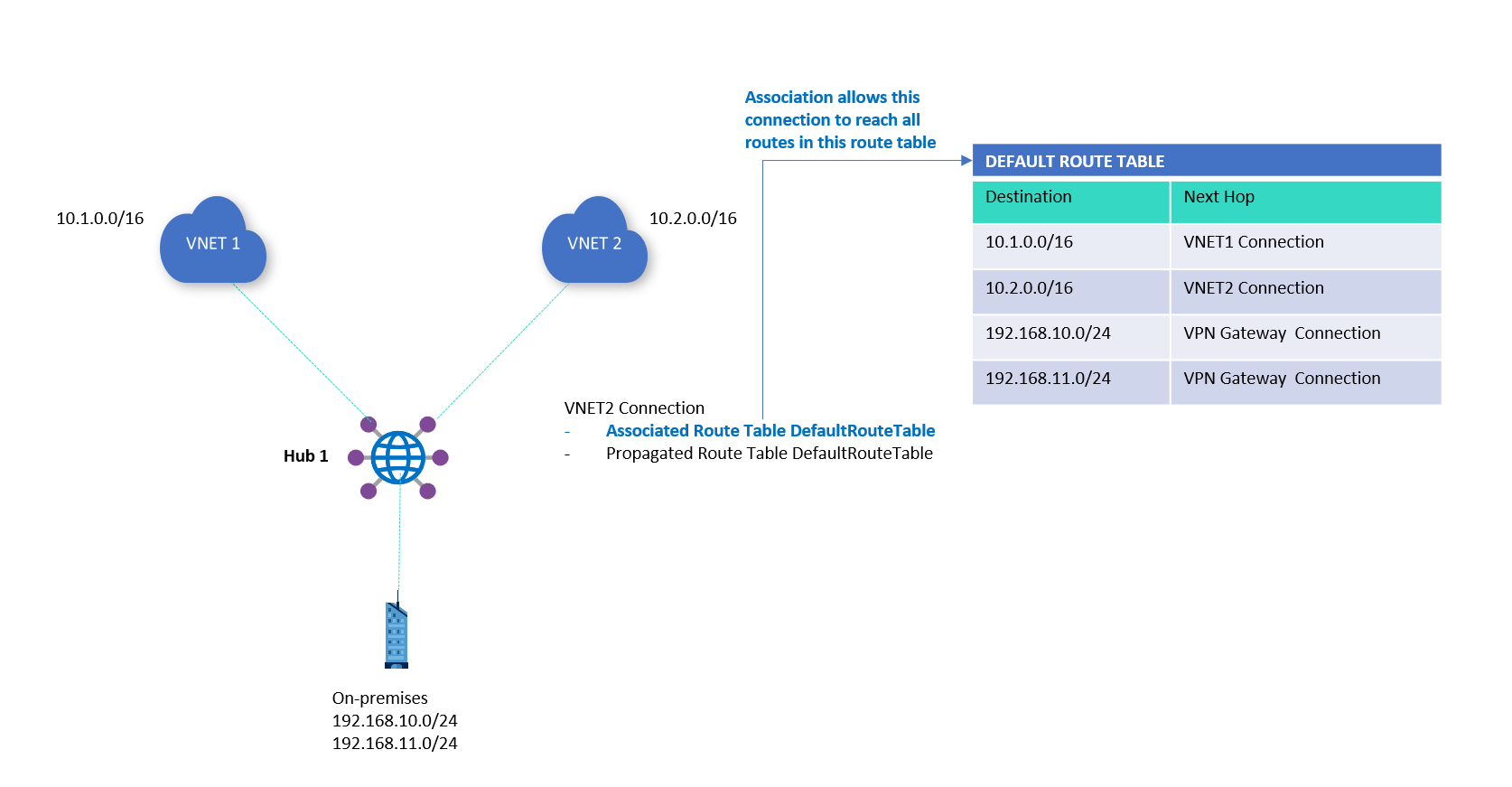
Routing in vWAN is not done with UDRs. It is done with route tables, but these are not the ones you are used to. These live inside the vWAN hub, and they control how traffic is forwarded between connections, not within a VNet. When you connect a VNet, branch, or ExpressRoute to the hub, you can choose which route table it associates with, and which tables it propagates its routes into. This gives you full control over who learns what, and how transit is managed.
The Association and Propagation Model
This model is at the heart of vWAN routing. It takes a bit of getting used to if you come from a world where route tables are applied at subnet level, but once it clicks, it becomes far more powerful.
- Association means the connection uses that route table to make forwarding decisions. When a packet enters the hub from that connection, this is the table used to decide where it should go.
- Propagation means the connection contributes routes into that route table. The prefixes from that connection (whether static or learned through BGP) are inserted into that table and made available for other connections to use.
Each connection (a VNet, branch VPN site, ExpressRoute circuit) can associate with one route table but can propagate into many.
This matters.
It means you can build multiple logical domains inside the same hub. You can allow one spoke VNet to send traffic to shared services but not to other spokes. You can allow a branch to talk to a data centre over ExpressRoute but deny it access to any VNets. You build the routing policy using these associations and propagations, not static next-hops.
Routing Intent Revisited
As mentioned in Chapter 3, Routing Intent is a higher-level abstraction. You enable it to tell the hub that certain traffic types like internet-bound flows or inter-spoke communication must be routed through Azure Firewall. This avoids the need to manually wire the inspection path.
The downside is that enabling Routing Intent rewrites your route tables in the background. You lose some visibility, and you cannot modify route tables that Routing Intent controls. This is why I often delay its implementation until the rest of the routing logic is confirmed. Once Intent is applied, debugging issues becomes more opaque.
In highly sensitive designs where control and visibility matter more than simplicity, I prefer to define custom route tables and manage associations manually. But that approach only works when you understand the implications.
Static vs Propagated Routes
vWAN lets you add static routes into any route table. These are useful for scenarios where:
- You want to override the default propagation path
- You are integrating legacy networks that do not speak BGP
- You need to temporarily hard-code a failover path
But if you lean too heavily on static routes, you lose what makes vWAN powerful. The platform is designed for dynamic propagation. The more you manually insert paths, the more brittle the design becomes.
Use static routes to plug gaps, not to build the structure.
Example: Spoke Isolation with Shared Services
Let’s say you have three VNets:
- SpokeA: A business unit workload
- SpokeB: Another business unit workload
- Shared: Centralised DNS, logging, and identity
You want both SpokeA and SpokeB to reach Shared, but not each other.
You would:
- Create a route table called
SpokeTable - Associate SpokeA and SpokeB with
SpokeTable - Propagate Shared into
SpokeTable - Create a separate
SharedTableand propagate SpokeA and SpokeB into it, but do not associate Shared with it
This allows traffic from A and B to reach Shared, but not each other. All without needing a single UDR or NVA.
The Trap of “Default”
When you first connect a VNet or branch to the hub, it defaults to using the Default route table. This seems convenient, but it is often the root of routing problems.
That table is used for general propagation, and any connection using it may end up seeing routes you did not intend to share. Always create your own route tables and be explicit about what connects to what. Relying on Default is like building a house and leaving the front door open just because it came with a key.
Observability and Gotchas
This is where things are still catching up.
vWAN’s route viewer has improved, but debugging routing behaviour still requires careful review of association and propagation settings. Route conflicts, overlaps, or shadowed prefixes can occur if you are not clear about your IP planning.
Do not assume everything propagates as you expect. Be deliberate. Map it out. Review the effective routes for each connection and simulate failure paths before pushing to production.
vWAN routing is not difficult once you learn its rules, but it is a shift in mindset. You are no longer wiring up networks. You are declaring who can talk to who and letting the platform handle the plumbing.
In the next chapter, we will focus on the VPN side of the hub. It is one of the most misunderstood parts of vWAN and one of the most powerful when configured correctly. Let’s clear that up next.
5. VPN in vWAN: Aggregation, Scale, and Resiliency
Back in the on-prem world, site-to-site VPNs were usually reserved for special cases. A quick link between data centres. A backup path if the leased line dropped. Or, occasionally, the only affordable way to connect remote sites in places where MPLS never made it.
In Azure’s early days, that thinking carried over. You’d deploy a gateway inside a VNet, define your local network, set up IPsec manually, and hope the SLA was good enough. If you needed multiple branch offices to connect to Azure, it often meant building a DMZ with an NVA to aggregate the tunnels. The standard VNet gateway could only take so much.
This model barely scaled. Performance was capped. Troubleshooting was tedious. And every additional tunnel made the design more brittle.
vWAN changes this completely.
The Managed Aggregator
In Virtual WAN, the VPN gateway is no longer something you deploy yourself. It’s built into the hub. You do not assign IP addresses. You do not provision scale units. You enable it, and Azure provisions a set of high-throughput, regionally resilient VPN endpoints.
You get:
- A pair of active-active gateway instances managed by Microsoft
- Support for thousands of simultaneous IPsec tunnels
- Built-in BGP for dynamic routing
- Automatic scale-out as more sites connect
This isn’t a software appliance pretending to be a hardware router. It is a native part of the backbone. You are not tunnelling into a VNet — you are tunnelling into Microsoft’s edge network.
Each VPN connection is treated as a Site, defined in the Virtual WAN resource. These can be created manually or via template, and each one represents a physical location or firewall endpoint on your side.
You can assign a site to a specific hub, configure BGP or static routing, and define link properties such as latency, bandwidth, and preferred path.
Active-Active by Default
When you connect to a vWAN VPN gateway, you are actually connecting to two gateway instances behind the scenes. These are deployed across fault domains and availability zones when supported by the region. Each one has its own public IP, and both are expected to be used.
Many third-party firewalls still default to active-passive setups. This is a problem.
If your on-prem device only supports one active session at a time, you are leaving half the SLA on the table. To benefit from Azure’s high availability, your devices need to support and maintain both tunnels simultaneously.
Failing to do this does not mean your connection will break, but it does mean you have introduced a single point of failure into a system that was designed to be resilient.
BGP Support That Actually Works
The vWAN VPN gateway fully supports BGP, and in large-scale networks this is critical. Rather than hardcoding address spaces, you let your on-prem device advertise prefixes dynamically.
The hub receives those routes, and depending on your propagation and association model, shares them with connected VNets, other hubs, or ExpressRoute paths.
You can even configure BGP communities or local preference to influence route selection. This brings real enterprise-grade routing control into a space that used to be a glorified static tunnel.
There is also support for ASN configuration on both the local and peer sides, including 16-bit and 32-bit ASN formats. This matters when connecting to ISPs or legacy systems that still rely on specific BGP conventions.
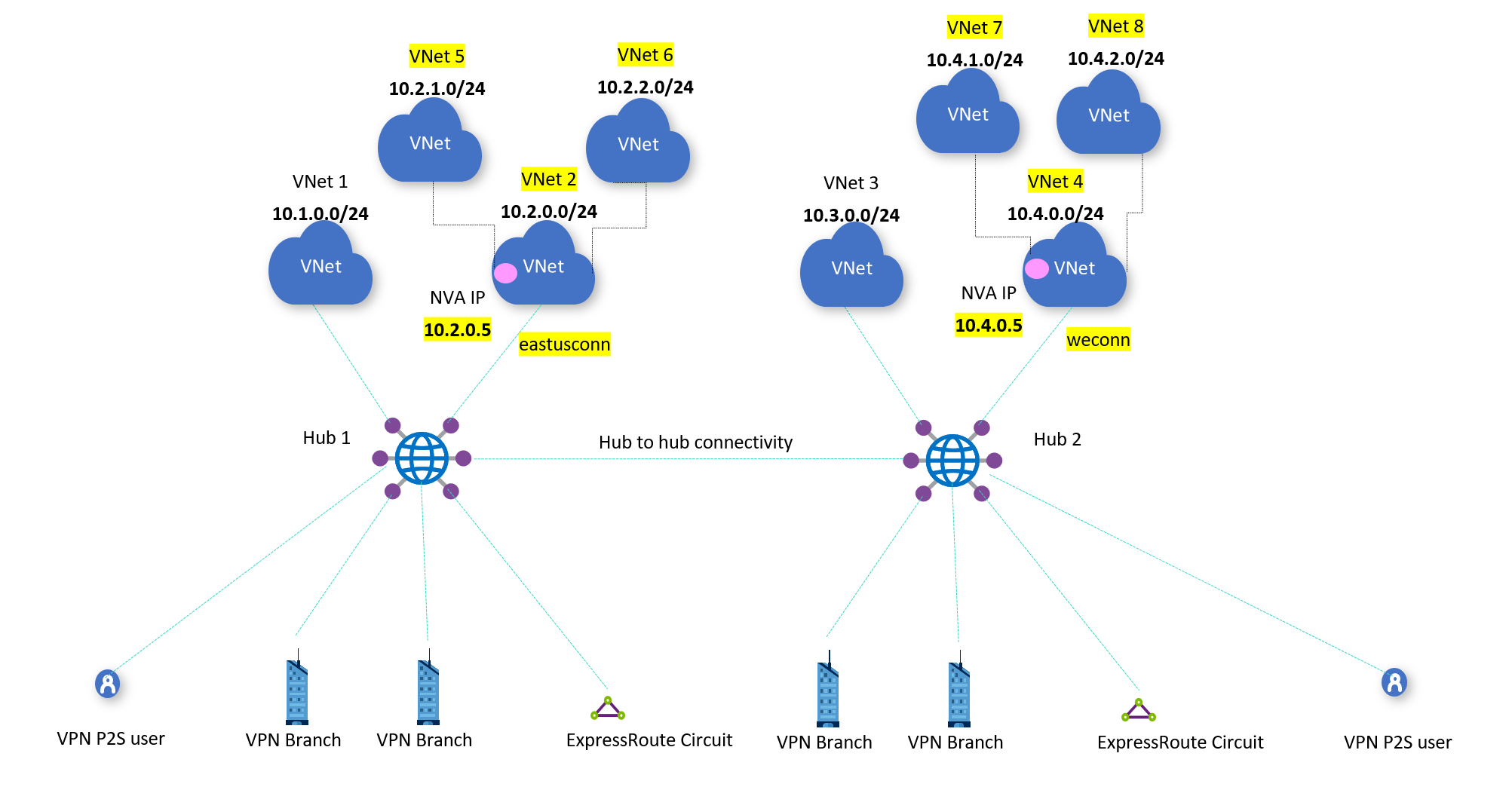
Multi-Site, Multi-Hub Design
In a global organisation, you may have dozens or hundreds of branch locations. With vWAN, you can:
- Group sites by geography
- Assign them to regional hubs
- Ensure low-latency entry to the Azure backbone
- Peer hubs together to allow transitive routing across sites
This is where the backbone starts to show its value. A site in South Africa can connect to a local hub, route to an application in North Europe via a different hub, and never traverse the public internet.
The key is to treat the VPN gateway as a distributed edge of Azure, not just a replacement for a VNet gateway. You are not building a star topology — you are connecting into a mesh.
Route Filtering and Split Tunnelling
Each site can be configured to receive a subset of routes. If you want certain sites to access only specific VNets or to exclude internet-bound routes from Azure, you can control this with custom route tables and routing intent.
You can also configure split tunnelling so that only specific prefixes are routed into Azure. The rest stays local. This is useful for:
- Regulatory restrictions
- Latency-sensitive applications
- Gradual cloud adoption from legacy branches
Just be aware that split tunnelling always introduces a decision point. If users at a site can reach both Azure and non-Azure resources, you must be deliberate about where DNS resolution occurs and which gateway becomes the default for return traffic.
Operational Considerations
Deploying a site takes more than a few clicks. You need to:
- Confirm device support for IPsec and IKEv2
- Ensure BGP timers and settings match Azure’s expectations
- Validate NAT traversal and UDP port access if firewalls are involved
- Monitor link performance using built-in Azure Network Insights
- Test failover by disabling one tunnel and watching traffic shift
You’ve now seen how Azure vWAN reshapes the foundations of network design. We’ve moved from traditional hub and spoke into something more dynamic, scalable, and cloud-native.
From the role of the Route Server to the power of the vWAN hub, and from routing control to VPN aggregation at serious scale, this has been the structural core of what makes vWAN different.
But this is only part of the story.
In Part Two, we go deeper into the critical edge cases that define success or failure in real-world deployments. We explore how ExpressRoute behaves inside vWAN and why it is not just a private circuit you plug in and forget. We look at how security architectures evolve, when Azure Firewall makes sense, and where NVAs still have an important role.
We finish with multi-region patterns, scaling pain points, and the kind of design pitfalls that only show up once you’re live.
If Part One showed you what vWAN is, Part Two will show you what it becomes when you push it at scale.