
I have to start with this, I genuinely love Azure Route Server! It is one of the most misunderstood and in my professional opinion, definitely one of the most under-utilised tools in Azure networking.
Writing this blog has been a blast because it has forced me to dig much deeper into the mechanics than I ever needed to in day-to-day work. That is the beauty of documenting, you end up learning even more.
1. Introduction: Why Route Server Exists
We left off last time wading through the swamp of User Defined Routes, the quiet little workhorses that keep Azure traffic flowing where you want it to go. They are the digital equivalent of hand painted road signs.
Reliable when placed correctly. Disastrous when one gets spun the wrong way in the wind. One wrong entry and suddenly your secure traffic is on a world tour, your hybrid link is doing the networking version of lost in the post, or production has gone down because a route decided to take the day off. The worst part is that Azure gives you no native way to centrally administer all those route tables.
Each one sits in its own silo. It is like being caretaker of a hundred remote lighthouses. You visit by hand, change the bulb, and hope you did not miss one. Wouldn’t it be nice to keep the precision of UDRs without the lighthouse tour? If the network could update itself when topology changes? That is where Azure Route Server enters.
It does not bulldoze your design. It takes over the grind and brings proper dynamic routing to the cloud world you probably assumed was already dynamic. Think of it as swapping a shoebox of handwritten directions for a sat nav that knows where all the roads are, reroutes automatically, and never asks you to go island hopping in the rain again.
2. The Black Box of Azure’s Underlying Fabric
If you have ever racked a physical router or switch, you know the satisfying click of a console cable and the certainty that comes from seeing exactly what is happening under the hood. Azure takes that cable away, locks the rack, and politely says, trust us, it is all working fine.
Azure’s fabric is a massively distributed software defined network. There is no chassis to point at. Your next hop might live in a different subnet, a different rack, or even a different availability zone, and you would not know it. That works brilliantly for scale and resilience, but it means you direct traffic with intent rather than with cables.
Your control is expressed through policy. In Azure networking that policy is UDRs, NSGs, service tags, and when you need adaptive path selection, BGP.
From a security standpoint, this is how we keep control in a system that is always adapting. By placing deliberate road signs into the fabric we ensure traffic crosses inspection points, sensitive workloads remain isolated, and untrusted paths are avoided.
For resilience, we can pre define failover routes so traffic is automatically re routed if a service or region has a problem. For scale, we can keep adding spokes, VNets, or regions without tearing up the core design, simply by adjusting policy.
Imagine running a large event with thousands of people moving between venues. You may not see every corridor they take, but with the right signs in the right places you can move everyone safely and efficiently without physically escorting them.
3. What Azure Route Server Actually Does
Azure Route Server is a managed Border Gateway Protocol service you place inside a VNet. It peers over BGP with supported devices such as your Network Virtual Appliances, VPN Gateways, and ExpressRoute Gateways. It does not forward packets. It is control plane only. No data ever flows through it.
What it provides in practice:
- Your NVAs advertise prefixes they can reach, for example RFC 1918 aggregates or application prefixes behind them. Route Server injects those routes into Azure’s VNet fabric so subnets in the hub and in the spokes learn the correct next hop without you editing UDRs everywhere.
- Azure advertises Azure learnt routes back to your NVAs. Your devices gain an accurate picture of the cloud environment and can choose the correct path without static configuration.
- If an NVA fails, the BGP session drops, its routes are withdrawn, and traffic converges on the remaining path. No ticket. No manual change.

This single change replaces spreadsheets of static routes with a living map that keeps itself up to date.
4. BGP in a Nutshell for this Context
BGP does not carry packets. It carries knowledge about paths to prefixes. That knowledge includes attributes such as AS Path, Local Preference, and MED which devices use to choose a best path. In Azure Route Server, BGP is the nervous system. Your NVAs tell Route Server what they can reach. Route Server tells NVAs and gateways what Azure can reach. Withdraw a route and the path disappears everywhere that matters.
A short while ago, someone said to me, BGP is a fad and will never catch on. That comment said a lot about how widely BGP is misunderstood. Here is why it matters. Without BGP, the internet simply would not work. At cloud scale, static lists do not keep up.
Two practical behaviours to be aware of:
- If Route Server receives the same prefix from more than one NVA with the same AS Path length, it installs multiple copies of the route with different next hops on the VM hosts. The platform then uses Equal Cost Multi Path.
- If one NVA advertises the same prefix with a shorter AS Path, that advertisement wins and only that next hop is programmed.
This is why Route Server often lets you retire load balancers that existed only to force traffic across a particular NVA. With BGP and ECMP, the platform steers to either peer automatically, and failover is handled by route withdrawal rather than by probing a VIP.
5. A (Fictional) Global Customer: Hub and Spoke at Scale
Consider a (fictional) global enterprise headquartered in UK South. It operates a hub and spoke model in three regions: UK South, a European region, and an Americas region. Each hub contains a pair of NVAs for inspection, an ExpressRoute Gateway for private connectivity, and a set of spokes carrying application subnets. The policy is clear. Spoke to spoke and spoke to on premises traffic must always traverse the local regional NVA before leaving the region.
Before Route Server the team manages UDRs in every spoke to steer north south and east west traffic to the hub NVA. Adding a new spoke means copying and adjusting routes. Introducing a new inspection path means a coordinated change across dozens of route tables. Convergence during failover depends on a load balancer’s health probes and may still be asymmetric for a while.
With Route Server in each hub the NVAs peer with the hub’s Route Server and advertise:
- RFC 1918 aggregates to steer private traffic through inspection.
- Specific on premises prefixes learned from ExpressRoute or VPN, so that hybrid flows pass through inspection.
- Optional defaults for internet egress to direct traffic through an egress firewall.
Spokes learn the correct path dynamically without any per spoke UDR management. If an NVA fails or is patched, its routes are withdrawn and traffic converges automatically to the remaining NVA.
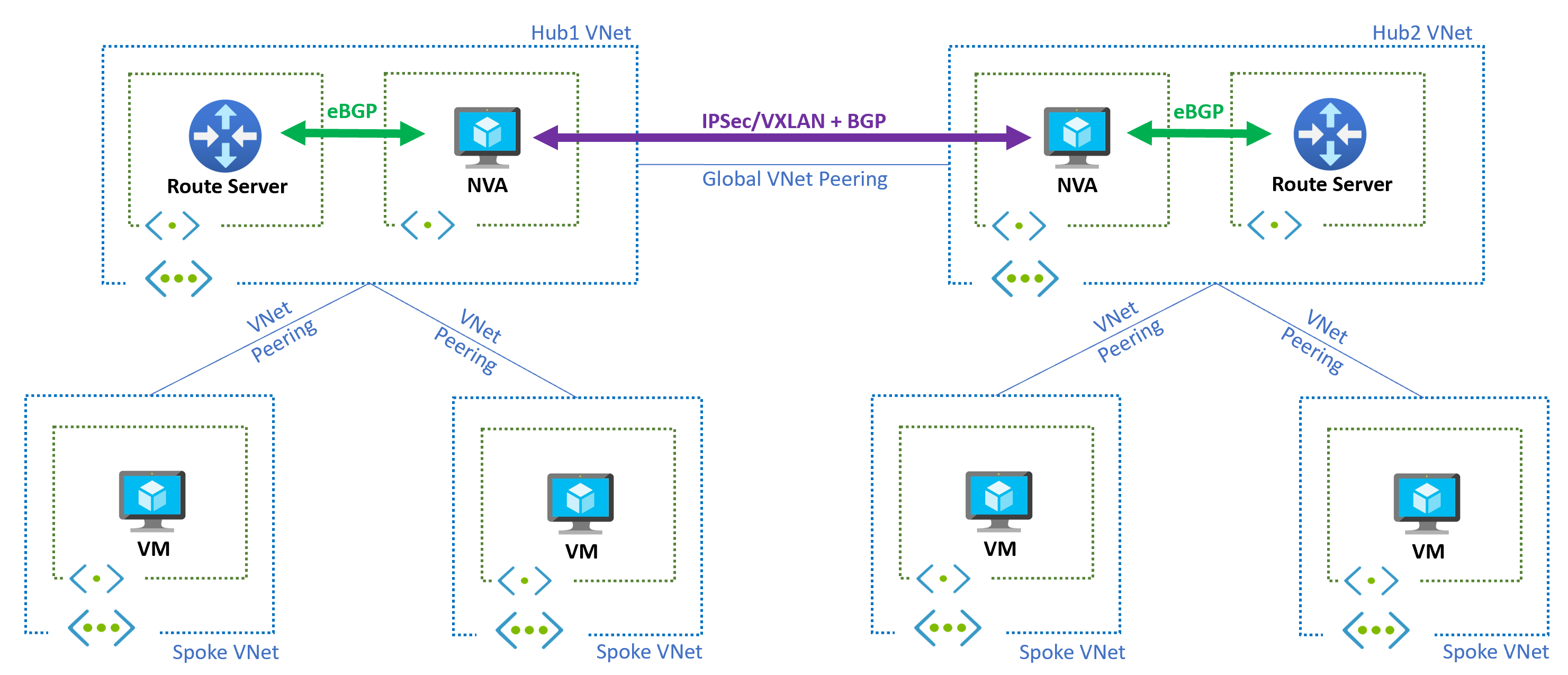
Packet walk for spoke to spoke across regions:
- Workload in Spoke A UK South sends to Workload in Spoke B West Europe.
- Spoke A host routes match RFC 1918 and point to the UK South NVA, because the NVA advertised those aggregates.
- UK South NVA consults its BGP table. It has a route to Spoke B West Europe learned from the West Europe hub via inter hub peering and BGP.
- Traffic is forwarded toward West Europe hub, then to Spoke B.
- If the West Europe NVA pair is active active and both advertise equally, ECMP splits flows within West Europe. If one fails, its routes are withdrawn and flows converge on the survivor.
Why this matters. The network now behaves like a living system. The control plane adapts when you add spokes, add subnets, or add regions. The data plane follows the intent you set, without you rewriting route tables.
6. NVAs, Load Balancers, and Why Route Server Simplifies
In classic Azure designs, NVAs are often fronted by a Standard Load Balancer. The reasons were sound at the time:
- You needed a single next hop IP for UDRs that could spread traffic across multiple NVA instances.
- You needed health probes to withdraw a failed NVA from service.
- You did not have a dynamic way to advertise the NVA as a next hop to the rest of the network.
Once Route Server is in play, that set of constraints changes:
- Each NVA can directly advertise the prefixes it wants to service. No need for a synthetic VIP next hop.
- If two NVAs advertise the same set of prefixes, Route Server will program two next hops and the Azure host stack will use ECMP.
- If one NVA fails, its BGP session drops and its routes withdraw. The platform converges to the surviving NVA without you tuning health intervals.
Edge cases and cautions:
- Stateful inspection still needs session stickiness at the NVA layer. ECMP splits by flow, not by packet, but be careful with asymmetric return paths if you also have other hubs.
- Some NVA vendors still recommend a load balancer for management plane reachability or specific fail open behaviours. Follow vendor guidance, but challenge whether it is still needed for data path.
- If you use TLS interception or other state heavy features, validate failover under load. BGP withdrawal is fast, but application timeouts also matter.
Operational benefits. Removing a front end load balancer from the data path removes a configuration surface and a fault domain. Troubleshooting becomes simpler because the route points to a real next hop, not a virtual one.
7. Combining Route Server with ExpressRoute
ExpressRoute is the primary path to on premises for many estates. You want private connectivity, predictable latency, and clear policy. The gap without Route Server is that NVAs in Azure do not automatically learn on premises networks unless you manually configure them or stitch complex BGP from on premises into every region.
With Route Server:
- The ExpressRoute Gateway learns on premises prefixes from your edge routers.
- Route Server learns those prefixes from the ER Gateway and makes them available to the NVAs.
- NVAs can make routing decisions for hybrid traffic without any static configuration.
- You can control preference with standard BGP policy. For example, prefer ER learned routes over VPN learned routes by setting Local Preference on premises or by AS Path length.
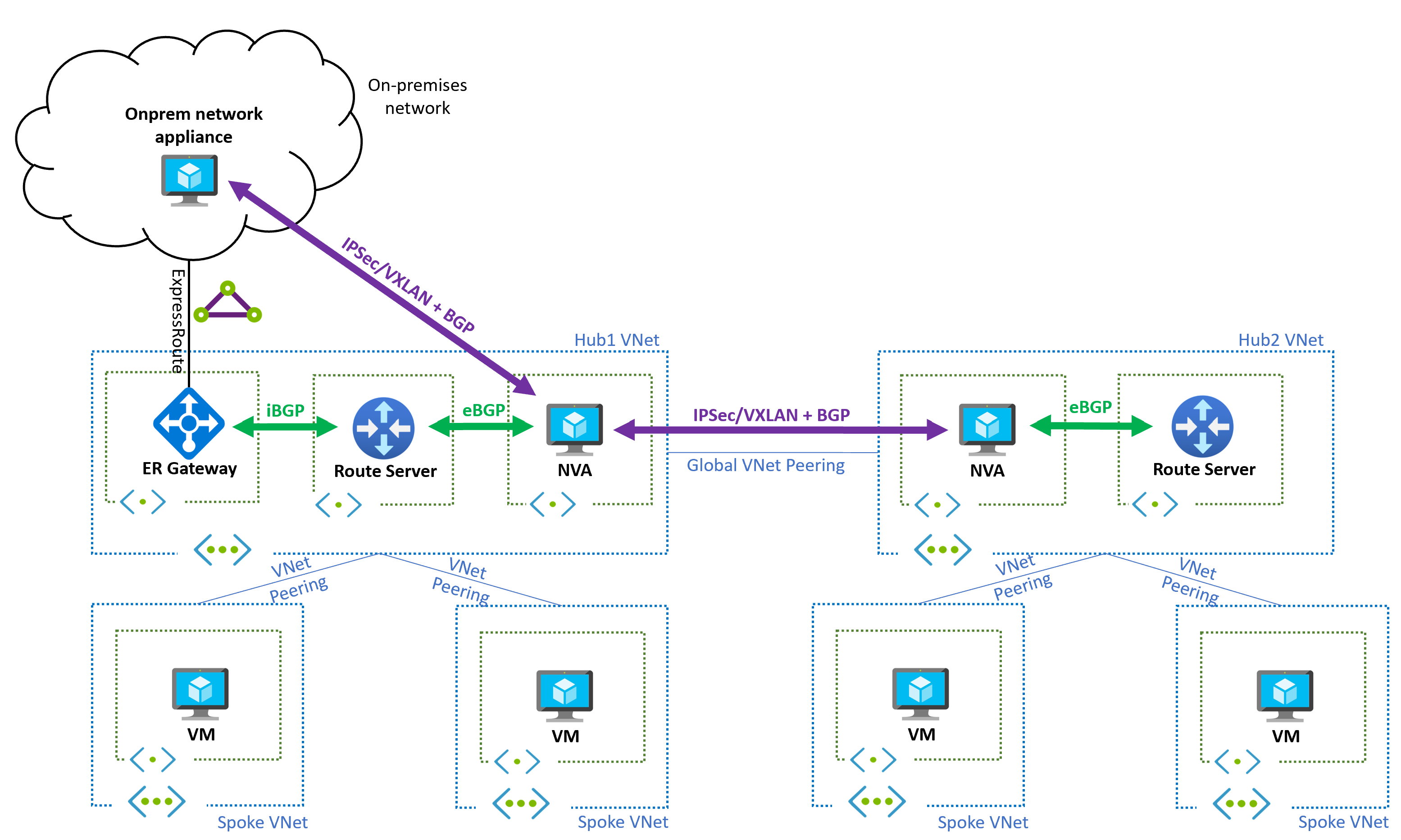
Design notes:
- Keep BGP peering local to the hub. Do not run long distance BGP sessions from a single hub to all other hubs.
- Decide early what should be region local and what should be global. Only advertise global prefixes inter region.
- Document who owns BGP policy. On premises usually owns Local Preference, Azure side owns what is advertised toward spokes.
Testing. Prove failover by administratively disabling the ER BGP session during a maintenance window. Watch the Route Server route table, watch the NVA route tables, and watch application flows. Nothing in spokes should need a change.
8. Route Injection with VPN and SD WAN
Site to site VPN is still the right answer for many branches and for DR. SD WAN brings path awareness and policy. The problem is the same as with ER. Without Route Server, NVAs in Azure need manual routes to understand branch networks, and branches need manual configuration to understand Azure spokes.
With Route Server, the VPN Gateway peers with it, allowing:
- Automatic advertisement of branch routes learned over VPN to the NVAs.
- Reverse advertisement of Azure spoke and hub routes back to on premises via the VPN Gateway.
- Clean failover between multiple tunnels when combined with SD WAN metrics and BGP.
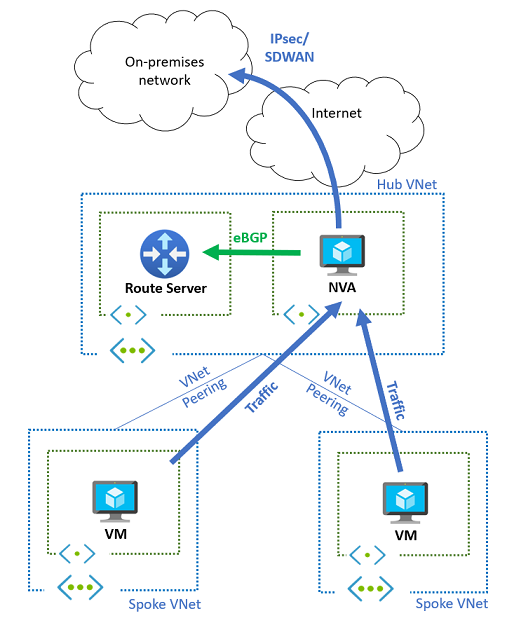
Two practical patterns:
- Branch to Azure with mandatory inspection
Branches advertise their local subnets into the hub over BGP. NVAs advertise inspected paths into the spokes. As branches appear or change, Azure learns the updates without any reconfiguration of spokes. Return traffic follows the same inspected path because the NVA is the best next hop. - Branch to branch through Azure
Some customers want branch to branch through the Azure hub for uniform security. With Route Server, the NVAs advertise the necessary routes and the platform handles convergence when a device or link fails. If you need to avoid sending some branch categories through Azure, use communities and filters to contain advertisement scope.
Failure drills. Drop one tunnel at the branch and watch route preference change at the hub. Drop the NVA BGP session and watch spokes converge to the remaining NVA.
9. VPN and ExpressRoute Together
High availability hybrid designs often connect both ExpressRoute and VPN into the same hub. ExpressRoute is preferred because of SLA backed private connectivity. VPN is the essential standby. The architectural goal is simple. Make failover automatic and transparent, with routing policy rather than with manual UDR changes.
Route Server is the traffic director that makes this clean. It establishes BGP with both the ExpressRoute Gateway and the VPN Gateway. Both gateways can advertise the same on premises prefixes to Route Server, but with different attributes to show preference.
Example policy:
- ExpressRoute Gateway advertises 10.0.0.0/8 with an AS Path length of 2.
- VPN Gateway advertises 10.0.0.0/8 with an AS Path length of 4.
- Azure honours shortest AS Path by default, so traffic prefers ExpressRoute.
- If ExpressRoute fails, its BGP session drops, routes are withdrawn, and VPN learned routes become the active path. Spokes do not change anything. They simply follow the best path now present in their host route tables.
Outbound and inbound symmetry. This is not only about inbound paths from on premises to Azure. Outbound flows from Azure workloads to on premises also shift seamlessly because the VNet host routes are updated by the control plane. No black holes caused by stale next hops.
Testing and operations:
- Conduct a planned failover by disabling the ER BGP session. Observe convergence in Route Server, in the NVAs, and at a test VM.
- Capture metrics. How long did it take for routes to withdraw and reappear. What did application latency look like.
- Document the procedure and the expected telemetry so future drills can be scored.
10. Adding a Firewall into the Path
Security policy must be consistent across spoke to spoke, spoke to hub, hub to on premises, and inter region flows. Static UDRs can force a firewall hop, but the approach is fragile at scale and slow to adapt when you add subnets or regions. With Route Server, the firewall becomes a participant in routing rather than a fixed bump in the wire.
Patterns that work well:
- Default toward egress. The firewall advertises 0.0.0.0/0 to attract internet bound traffic. If the firewall is patched or fails, that default withdraws and traffic follows the backup policy you defined.
- Private aggregation. The firewall advertises 10.0.0.0/8, 172.16.0.0/12, and 192.168.0.0/16 to ensure spoke to spoke and spoke to hub traffic is inspected. You can be more granular if needed.
- Hybrid awareness. The firewall re-advertises selected on premises prefixes learned from the ExpressRoute or VPN Gateway so that hybrid traffic also crosses inspection.
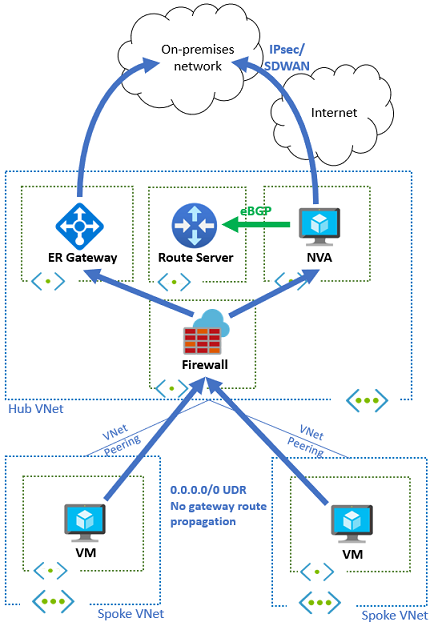
Active active without a load balancer. If both firewalls advertise the same prefixes with equivalent attributes, Route Server programs two next hops and the platform can use ECMP to split flows. Health is signalled by BGP session state and route withdrawal. You remove a load balancer from the data path and with it an entire class of probe related failure.
Zero Trust and containment. Use BGP communities and prefix filters to contain the spread of routes. Route Server supports the NO_ADVERTISE community. If an NVA tags a route with NO_ADVERTISE, Route Server will not pass it to other peers including the ExpressRoute Gateway. This helps keep route volume down and prevents accidental exposure of lab or test prefixes.
Operational guardrails:
- Enable MD5 authentication on all BGP sessions. Store keys in Key Vault or your secret manager.
- Accept only what you expect. For example, block inbound 0.0.0.0/0 unless you truly intend to learn a default from that peer.
- Monitor BGP session health, route counts, and the appearance of new defaults. Alert on anomalies.
- Test failover under load with real applications. Make sure timeouts and logs are acceptable.
11. Limits and Practical Considerations
Per current Microsoft documentation, per Route Server deployment:
- Up to 8 BGP peers.
- Up to 1,000 prefixes advertised to Route Server per peer by default. This can be raised to 4,000 via a support case. If an NVA advertises more than the limit, the BGP session drops.
- Up to 4,000 VMs across the connected VNets including peered VNets.
- Up to 500 VNets supported.
- Up to 10,000 total on premises and Azure VNet prefixes supported.
Design tips:
- Aggregate where possible. Do not spray thousands of small prefixes at the platform if a few aggregates will do.
- Filter rebroadcasts. Many on premises routes do not need to be known by every spoke.
- Keep peering local to a hub. If you need to share globally, share only what must be global.
12. Security Model and BGP Communities
Public IP requirement. Route Server requires a public IP with specific ports open. This is not a data plane exposure. Those endpoints are for Azure’s SDN and management platform to reach the service. Connectivity is certificate authenticated and routinely audited. Route Server remains part of your private network and cannot be used to inject traffic into your VNet.
BGP policy is your safety net:
- MD5 authentication on every BGP session.
- Prefix filtering both inbound and outbound.
- NO_ADVERTISE support to limit how far a route spreads.
- Monitoring for session drops, route count spikes, and new default routes.