
Before we get into Azure Route Server, let’s talk about something that throws nearly every on‑premises network engineer off balance, especially if, like me, you come from a Cisco background and the first time you step into Azure: the never‑ending tangle of route tables, and what at first seems a backward step in networking.
In a traditional world, routes were simple. You had a router. It had interfaces. You knew exactly which side of the network a packet came from and where it needed to go. Routing was often automatic, mostly physical, and rarely touched unless something broke or a new site came online. For all its quirks, it made sense.
Then you land in Azure and discover you need to build User Defined Routes (UDRs) for what feels like… everything.
- If you want traffic from a spoke to reach your firewall = UDR.
- If you want to steer traffic through a NVA = UDR.
- If you want to override a default internet route = UDR.
- If you want to peer a VNet and keep it secure = UDR.
- If you’re using Virtual WAN or ExpressRoute or Private Link, guess what… UDR.
At first glance, it feels like we’ve gone backwards. All this software‑defined magic and we’re still hand‑crafting route tables like it’s 2005. But there are good reasons for it, and understanding them is the key to designing Azure networks properly.
So why does Azure need UDRs? Why is this “manual routing” still a thing?
1. Microsoft’s Global Network Isn’t a Flat LAN
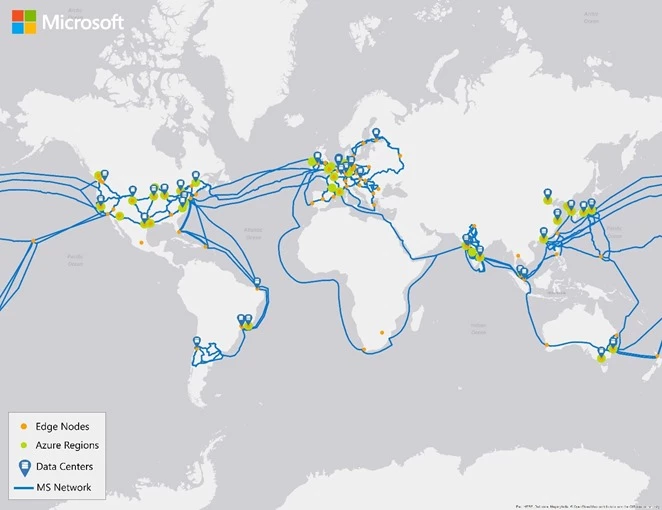
Microsoft owns one of the largest and most advanced global networks in the world, spanning over 180 global edge sites and interconnecting every Azure region with lightning‑fast private fibre. When you connect a spoke VNet in UK West to a service in UK South, that traffic doesn’t touch the public internet, it stays entirely inside Microsoft’s backbone.
That’s brilliant for performance and security, but it also means you can’t rely on legacy routing behaviour. Traffic might take unexpected paths because Azure assumes global reachability is a good thing, and it is… until you need inspection, segregation, or policy enforcement. That’s where UDRs come in. They act like signs at junctions, telling Azure exactly where to send traffic instead of letting the system decide for you.
2. Software‑Defined Networking Doesn’t Care About Physical Rules
This is where the old‑school networking mindset really collides with cloud.
In Azure, your “next hop” could be in a completely different subnet. It might even be in a completely different availability zone. There’s no physical router in the middle that sees the packet and chooses a path. Instead, the Azure fabric (the underlying SDN platform) looks at metadata, route tables, NSGs, service tags, and BGP announcements and decides where the packet goes.
And that decision needs to be instructed explicitly. If you want traffic to pass through a firewall in a different subnet before hitting the internet? You don’t patch cables or configure OSPF, you write a UDR. It’s the Azure‑native way of injecting logic into a topology that doesn’t physically exist.
3. You’re Working With a Multi‑Layered Routing Stack
Azure doesn’t just look at one route table. It combines:
- System routes (the defaults that every VNet gets)
- User Defined Routes (UDRs) (which you apply per subnet)
- BGP routes (if you’re using VPN Gateway or ExpressRoute)
- Peering routes (if your VNets are connected)
- Private Link routes (if you’re pulling services into your VNet)
- And more…
Each of these layers has a specific priority and behaviour, and only UDRs allow you to override all the rest. If you don’t use them, you’re trusting Azure’s defaults which may be fine 80 percent of the time, but that other 20 percent is where problems, security risks, and routing black holes appear.
4. You’re Not Working With Physical Network Gear
This one often goes unsaid, but it matters.
In on‑prem, you design a topology that enforces rules with physical location. In Azure, you simulate the topology and the only way to enforce it is through logic. UDRs give you the ability to simulate a network design that otherwise has no physical enforcement.
Want spoke‑to‑spoke traffic to flow through an inspection point? Simulate it with UDRs.
Want to isolate storage access so only one subnet can reach it? Use UDRs.
Want to steer internet‑bound traffic through a proxy NVA before it exits? UDRs again.
They’re not optional. They’re the steering wheel and brake pedal in an otherwise self‑driving network.
UDRs aren’t elegant. They aren’t glamorous. And at scale, managing them can quickly turn into a nightmare.
But they’re the price we pay for the flexibility and abstraction of cloud.
And that’s why what comes next is so important.
Because if we can reduce the pain of static route management… maybe we can finally make cloud routing feel modern again.